Skip to content
















































A well-designed structured cabling system is not only about selecting high-quality cables and connectivity products—it also depends on effective cable management. Proper cable routing improves airflow, simplifies maintenance, protects cable performance, and allows future network expansion without creating unnecessary complexity.
One common mistake is treating all cables the same. In reality, patch cords and trunk cables perform different roles within a network, resulting in different routing priorities. Understanding these differences makes it much easier to choose the most suitable cable management solution for each part of the rack.
Why Patch Cords and Trunk Cables Require Different Cable Management
Although both are essential components of a structured cabling infrastructure, patch cords and trunk cables have very different installation characteristics.
Patch cords are short, flexible cables that connect patch panels, switches, servers, and other active equipment inside the rack. These connections are frequently modified during equipment upgrades, moves, adds, and changes (MACs). Since technicians interact with these cables regularly, cable management should focus on visibility, accessibility, and fast identification.
Trunk cables, on the other hand, serve as the permanent backbone between cabinets, equipment rooms, or distribution areas. They typically contain a larger number of fibers or copper pairs bundled together and remain unchanged after installation. Their cable management requirements place greater emphasis on routing stability, bend-radius protection, cable support, and sufficient pathway capacity for future growth.
Because these two cable types have different operational characteristics, applying the same cable management method throughout the rack often reduces efficiency. Selecting the appropriate cable manager according to the routing task creates a cleaner installation and simplifies long-term maintenance.
Patch Cord Management: Prioritizing Accessibility
The front of the rack is typically the busiest working area in a network cabinet. Patch cords are constantly connected, disconnected, or rerouted as equipment changes over time. An effective cable management solution should allow technicians to quickly trace individual cables while preventing congestion around switch and patch panel ports.
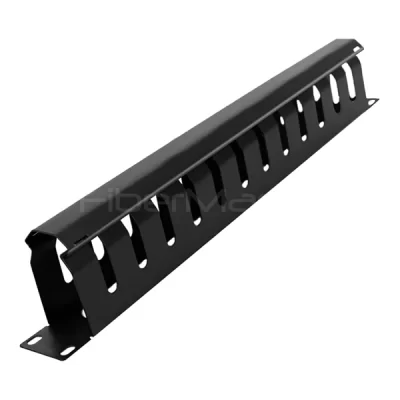
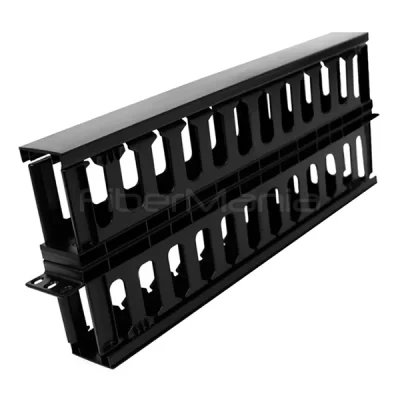
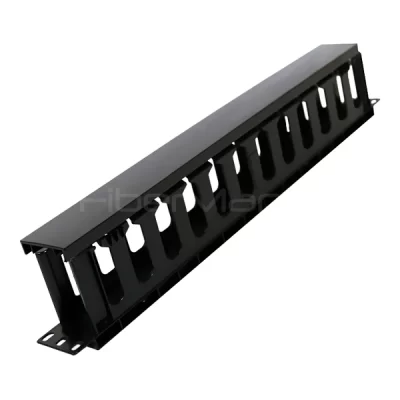
Horizontal cable managers are commonly used for this purpose because they create organized routing channels directly in front of networking equipment. By guiding patch cords horizontally before they travel vertically, cable bundles remain separated and individual connections become easier to identify.
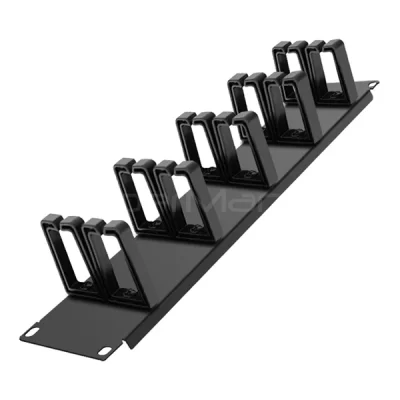
Finger-style cable managers are particularly effective in these environments. Their routing fingers divide patch cords into smaller groups, reducing tangles and making cable additions or removals much easier. Flexible fingers allow cables to be inserted without excessive force, while removable covers provide convenient access during maintenance without disturbing adjacent cables.
In environments where cable layouts change frequently, open-frame D-ring cable managers offer greater routing flexibility. Their open design allows technicians to quickly reroute cables during rack deployment, troubleshooting, or network expansion without removing existing cable bundles. This approach is especially useful when routing patterns are expected to evolve over time.

Trunk Cable Management: Supporting High-Density Backbone Cabling
Unlike patch cords, trunk cables are designed for long-term service. They often enter the rack from overhead trays, underfloor pathways, or adjacent cabinets before connecting to patch panels or distribution hardware.
Because these bundled cables occupy significantly more space, vertical cable managers are generally the preferred solution. Installed along one or both sides of the rack, they provide dedicated pathways that support large cable bundles while reducing mechanical stress on the cables.
A properly designed vertical cable manager should provide:
- Adequate routing capacity for high-density cable bundles
- Consistent bend-radius protection
- Even cable distribution throughout the rack height
- Stable cable support during long-term operation
- Room for future cable additions without excessive congestion
Flexible routing fingers help guide cables into appropriate exit points while maintaining recommended bend-radius requirements. Protective covers keep cable pathways organized, reduce dust accumulation, and improve the overall appearance of the installation.
For racks that do not require full-height cable management, compact bend-radius managers can be installed in localized routing areas. These products are useful for guiding breakout cables or protecting transition points between different routing directions without occupying the entire rack side.
Matching Cable Managers to Different Routing Scenarios
There is no universal cable manager that fits every application. Instead, each section of the rack should be evaluated according to its maintenance frequency, cable density, and routing direction.
| Application | Recommended Cable Management Priority |
|---|---|
| Switch-to-patch panel patching | Horizontal cable manager for organized front-of-rack routing |
| Frequent MAC operations | Finger duct or open D-ring manager for easy cable access |
| High-density backbone cabling | Full-height vertical cable manager |
| Overhead or underfloor cable entry | Vertical routing with bend-radius protection |
| Local cable breakout areas | Compact bend-radius cable manager |
By combining different cable management solutions within the same rack, network administrators can optimize both operational efficiency and long-term scalability.
Benefits of Proper Cable Management
Choosing the right cable manager provides advantages beyond simply making a rack look neat. Organized cable routing improves everyday operations while helping protect network infrastructure throughout its service life.
Key benefits include:
- Faster cable identification and troubleshooting
- Reduced risk of accidental cable disconnection
- Better airflow around active equipment
- Improved bend-radius protection for copper and fiber cables
- Simplified maintenance during network upgrades
- Greater rack capacity for future expansion
- Cleaner, more professional infrastructure appearance
These improvements become increasingly valuable in high-density environments such as enterprise data centers, telecommunications rooms, campus networks, and industrial communication facilities.
Building a Scalable Structured Cabling System
As network density continues to increase, cable management should be considered an integral part of infrastructure design rather than an accessory added after installation. Selecting cable managers based on actual routing requirements allows patch cords and trunk cables to be managed more efficiently throughout the life of the network.
Horizontal cable managers provide the accessibility needed for active patching areas, while vertical cable managers create stable pathways for backbone cabling and future expansion. Using each solution where it performs best results in a cleaner rack, easier maintenance, and a structured cabling system that remains organized as network demands continue to grow.
FAQ
1. What is the difference between a horizontal cable manager and a vertical cable manager?
A horizontal cable manager is typically installed between patch panels, switches, or other rack-mounted equipment to organize patch cords across the front of the rack. It provides easy access for frequent Moves, Adds, and Changes (MACs).
A vertical cable manager is mounted along the sides of the rack and is designed to support larger cable bundles, such as trunk cables entering from overhead or underfloor pathways. It provides higher routing capacity, better cable support, and improved bend-radius protection for long-term cable management.
2. Why shouldn’t patch cords and trunk cables use the same cable management method?
Patch cords are frequently connected, disconnected, and rerouted during daily network maintenance, so they require cable management that emphasizes accessibility and quick identification.
Trunk cables, however, are generally installed as permanent backbone connections. Their management priorities focus on pathway stability, cable protection, and supporting high-density cable bundles. Using dedicated cable management for each type improves maintenance efficiency and helps keep the rack organized.
3. How do I choose the right cable manager for my rack?
The selection depends on several factors, including:
- Cable type (patch cords or trunk cables)
- Rack size and available space
- Cable density
- Frequency of maintenance
- Future expansion requirements
For front-of-rack patching, horizontal cable managers are usually the preferred solution. For high-density backbone cabling, vertical cable managers provide greater routing capacity and long-term cable support.
4. What are the benefits of using finger-duct cable managers?
Finger-duct cable managers help organize cables into dedicated routing channels while maintaining proper bend radius. Compared with unmanaged routing, they offer several advantages:
- Better cable organization
- Faster cable identification
- Easier cable additions and removals
- Reduced cable congestion
- Lower risk of accidental disconnections during maintenance
These features make finger-duct managers especially suitable for data centers and enterprise network cabinets with frequent MAC activities.
5. Are vertical cable managers necessary for every network rack?
Not necessarily. Smaller network cabinets with relatively few cables may only require horizontal cable management.
However, for medium- to high-density racks, especially those supporting large fiber optic or copper backbone cable bundles, vertical cable managers significantly improve cable organization, routing capacity, and long-term maintainability.
6. How does proper cable management improve network reliability?
Well-managed cables are less likely to experience excessive bending, tension, or accidental disconnection. Organized routing also makes troubleshooting faster, improves airflow around active equipment, and reduces the likelihood of human error during maintenance. Together, these factors contribute to a more reliable and scalable network infrastructure.
7. Can fiber optic and copper cables share the same cable manager?
Yes, in many cases they can, provided the cable manager offers adequate routing space and proper bend-radius protection. However, installers should avoid overfilling cable pathways and should route fiber optic cables carefully to prevent excessive bending or compression. In high-density environments, separating fiber and copper pathways may further simplify maintenance and cable identification.
8. What should I consider when planning cable management for future network expansion?
When designing a structured cabling system, it is advisable to reserve additional cable routing capacity beyond current requirements. Selecting cable managers with sufficient pathway space, modular routing options, and easy cable access allows new cables to be added without disrupting existing infrastructure. This approach reduces future installation costs and extends the service life of the cabling system.